Types of Barcode Scanners
Published: 27 Aug 2026
Not every barcode scanner is right for every job. A scanner that works well at a store counter may not work well in a busy warehouse. I have found that many beginners run into this problem because they choose a scanner without first checking the barcode type, scanning distance, or work setting.
Barcode scanners are one of the many types of scanners used for specific tasks. Understanding the types of barcode scanners can help you choose the right one. Scanners use different technologies and designs. Some read standard 1D barcodes. Others can also read QR codes and other 2D codes.
In this guide, I will break down the main types with images in easy way. You will learn how they differ by technology, design, barcode format, and connection. We will also use the term barcode reader, which is another common name for a barcode scanner.
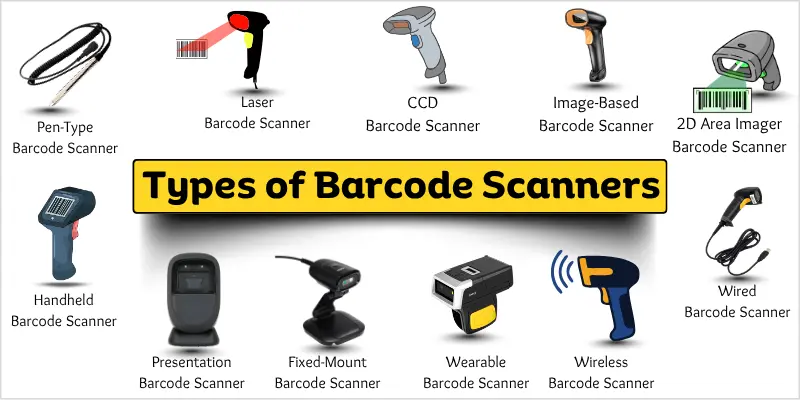
Types of Barcode Scanners
Barcode scanners come in different types for different scanning needs and work settings. You can classify them by scanning technology, physical design, barcode format, and connection method.
Quick List of Types of Barcode Scanners:
- Pen-Type Barcode Scanner
- Laser Barcode Scanner
- CCD Barcode Scanner
- Image-Based Barcode Scanner
- 2D Area Imager Barcode Scanner
- Handheld Barcode Scanner
- Presentation Barcode Scanner
- Fixed-Mount Barcode Scanner
- Wearable Barcode Scanner
- Wired Barcode Scanner
- Wireless Barcode Scanner
These types can overlap. For example, a handheld barcode scanner can use laser or imaging technology. A wireless scanner can also be handheld, fixed-mount, or wearable.
Let’s understand these different scanners types one by one.
Types of Barcode Scanners by Scanning Technology
Barcode scanners use different technologies to read barcode data. Each technology works in its own way and suits different scanning needs.
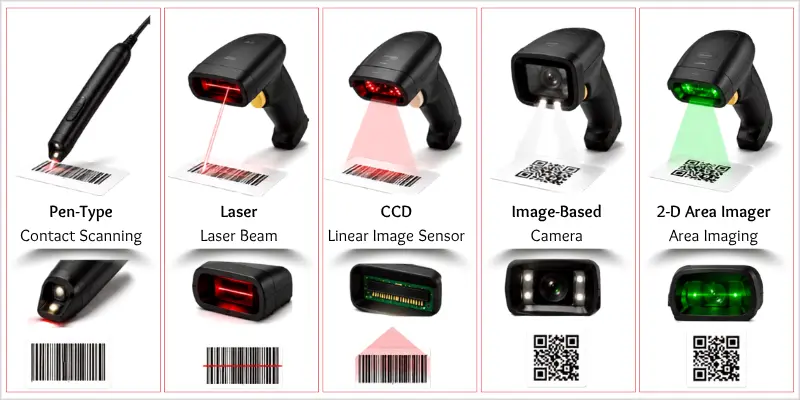
Pen-Type Barcode Scanner
A pen-type scanner reads a barcode with a small scanning tip.
It has a pen-like shape with a light source and sensor. You move the tip across the barcode to capture its pattern. The scanner then turns that pattern into readable data.
Common Uses:
- Small shops
- Libraries
- Basic inventory tasks
- Simple data entry
Benefits:
- Simple design
- Lightweight and easy to carry
- Easy to understand and operate
- Useful for basic scanning tasks
Limitations:
- Requires careful movement across the barcode
- Needs close contact with the barcode
- Can be harder to use than modern scanners
- May have trouble with damaged or poorly printed barcodes
Laser Barcode Scanner
A laser scanner reads barcodes with a focused laser beam.
A laser barcode scanner shines a laser beam across the barcode. The light reflects from the dark and light bars. A sensor detects these reflections and turns the pattern into barcode data. Most laser scanners are designed for 1D barcodes, such as UPC and EAN codes.
Common Uses:
- Retail checkout counters
- Grocery stores
- Inventory management
- Libraries
- Shipping and receiving
Benefits:
- Reads 1D barcodes quickly
- Works well for common retail barcodes
- Can scan from a short distance
- Provides fast and reliable scanning
Limitations:
- Usually cannot read 2D barcodes
- Does not work well with QR codes
- May struggle with damaged or poorly printed barcodes
- Has less flexibility than modern image-based scanners
CCD Barcode Scanner
A CCD scanner reads barcodes with a row of light sensors.
CCD stands for Charge-Coupled Device. A CCD barcode scanner uses many small light sensors to capture the barcode pattern. The sensors detect the difference between dark and light areas. The scanner then turns this pattern into barcode data.
Common Uses:
- Retail checkout counters
- Small stores
- Inventory tasks
- Libraries
- Office environments
Benefits:
- Reads 1D barcodes quickly
- Has no moving laser parts
- Works well at close range
- Provides consistent scanning
Limitations:
- Usually needs to be close to the barcode
- Has a shorter scanning range than some laser scanners
- May not read 2D barcodes
- Can struggle with damaged or poorly printed codes
Image-Based Barcode Scanner
An image-based barcode scanner uses a camera to capture a barcode image.
It takes a picture of the code and uses that image to read the stored data. This type of scanner can handle different barcode shapes and works without the need for a laser beam.
Common Uses:
- Retail stores
- Inventory management
- Shipping and receiving
- Product tracking
Benefits:
- Reads barcodes from different angles
- Can scan damaged or poorly printed codes in some cases
- Can scan many types of barcodes
- Uses camera-based scanning
2D Area Imager Barcode Scanner
A 2D area imager is designed to read 2D barcodes quickly and accurately.
It can read codes such as QR Codes and Data Matrix codes. Many models can also scan codes shown on phone screens. This makes them useful for modern tasks that use digital tickets, mobile payments, and other 2D codes.
Common Uses:
- Mobile payments
- Digital tickets
- Retail checkout
- Inventory tracking
- Shipping and logistics
Why It Is Useful:
- Reads QR Codes and Data Matrix codes
- Can scan codes from phone screens
- Supports 2D barcode scanning
- Useful for modern scanning needs
Types of Barcode Scanners by Design
Barcode scanners come in different physical designs for different work settings. Their shape and setup affect how you hold, place, and use the scanner.
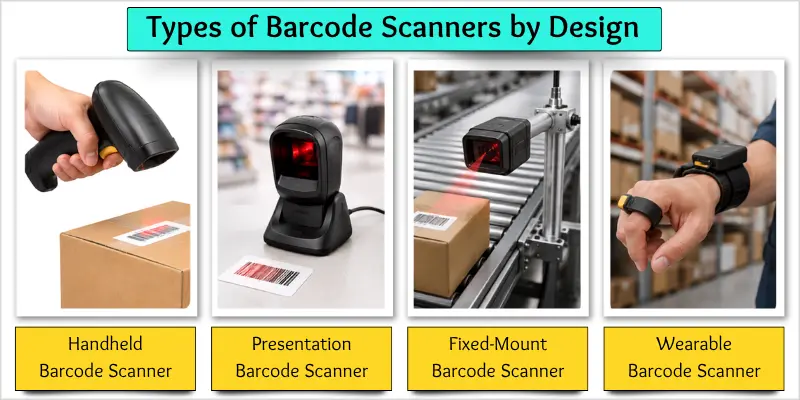
Handheld Barcode Scanner
A handheld barcode scanner is a portable device that you hold while scanning.
It is easy to move from one item to another. You point the scanner at a barcode and press its trigger to scan. Many handheld models use laser or imaging technology, so the exact scanning method can vary by model.
Common Uses:
- Retail stores
- Warehouses
- Inventory management
- Shipping and receiving
- Stockrooms
Benefits:
- Easy to carry and use
- Works well in different locations
- Makes item-by-item scanning simple
- Useful for retail and inventory tasks
- Gives workers more control while scanning
Limitation:
- You need to hold the scanner while scanning
Presentation Barcode Scanner
A presentation barcode scanner is a fixed scanner for hands-free scanning.
It sits on a counter or stand. Instead of picking it up, you simply hold the barcode in front of the scanner. The scanner detects and reads the code automatically. This makes it useful when workers need to scan many products quickly.
Common Uses:
- Retail checkout counters
- Grocery stores
- Small shops
- Customer service desks
- Point-of-sale systems
Benefits:
- Allows hands-free scanning
- Speeds up checkout tasks
- Easy to use
- Reduces the need to hold a scanner
- Works well for frequent product scanning
Limitations:
- Needs a fixed location
- Less flexible than a handheld scanner
- Takes up counter space
- May not suit large or bulky items
Fixed-Mount Barcode Scanner
A fixed-mount barcode scanner stays in one set location.
You install this scanner on a machine, counter, wall, or conveyor system. It scans items as they pass in front of it. This allows businesses to automate barcode scanning without a worker holding the scanner.
Common Uses:
- Warehouses
- Manufacturing plants
- Conveyor systems
- Shipping centers
- Automated sorting systems
Benefits:
- Supports hands-free scanning
- Works well for high-volume scanning
- Reduces manual scanning work
- Fits automated systems
- Provides consistent scanning in a fixed area
Limitations:
- Cannot easily move from one location to another
- Requires proper installation
- May need extra setup with automated systems
- Not ideal for scanning items in different locations
Wearable Barcode Scanner
A wearable barcode scanner lets you scan items while keeping your hands free.
You can wear this type of scanner on a finger, hand, or wrist. Some models work with a wearable computer or other mobile device. They let workers scan items without putting down the scanner. This can make repeated scanning tasks easier in busy work areas.
Common Uses:
- Warehouses
- Inventory management
- Order picking
- Shipping and receiving
- Retail stockrooms
Benefits:
- Keeps both hands available
- Makes repeated scanning easier
- Helps workers move around freely
- Useful for fast inventory tasks
- Reduces the need to hold a scanner
Limitations:
- May take time to get used to
- Can cost more than basic handheld scanners
- May need a compatible wearable device
- Not ideal for every scanning task
Types of Barcode Scanners by Connection
Barcode scanners can also differ by how they connect to a computer or other device. The two main options are wired and wireless barcode scanners.
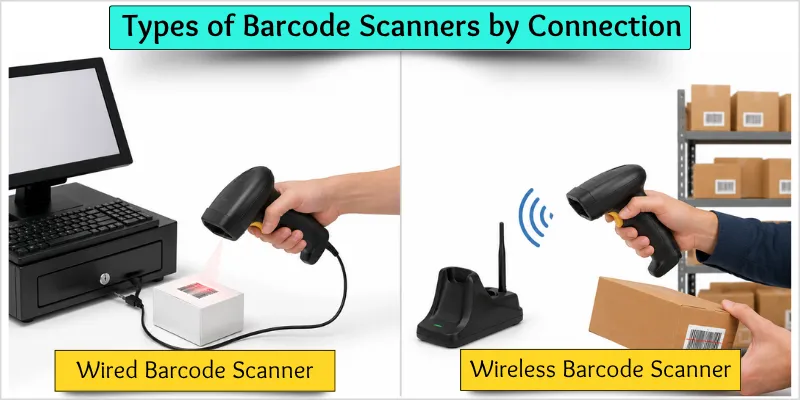
Wired Barcode Scanner
A wired barcode scanner connects to a device with a cable.
It commonly uses a USB connection to send scanned barcode data to a computer or POS system. The cable provides a steady connection and works well at fixed workstations.
Best For:
- Retail checkout counters
- Office workstations
- Inventory desks
- Libraries
- Point-of-sale systems
Wireless Barcode Scanner
A wireless barcode scanner connects to a device without a cable.
It commonly uses Bluetooth or another wireless connection to send scanned barcode data to a computer, tablet, or POS system. The wireless design gives you more freedom to move around while scanning items.
Best For:
- Retail stores
- Warehouses
- Inventory management
- Shipping and receiving
- Stockrooms
Types of Barcode Scanners by Barcode Type
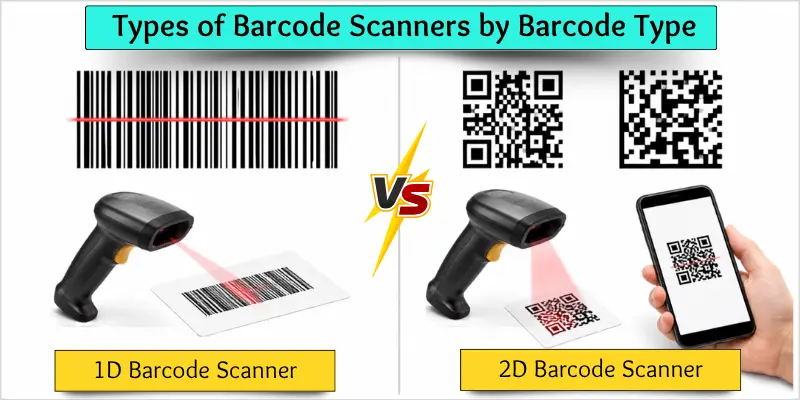
Barcode scanners also differ by the type of barcode they can read. The two main formats are 1D and 2D barcodes, and each works well for different scanning needs.
1D Barcode Scanner
A 1D barcode scanner reads barcodes made of lines and spaces.
1D barcodes store data in a series of parallel lines. Common examples include UPC and EAN barcodes. These scanners are widely used to scan products in stores and manage basic inventory.
Best For:
- Retail checkout
- Grocery stores
- Product tracking
- Inventory management
- Libraries
2D Barcode Scanner
A 2D barcode scanner reads barcodes that store data in two dimensions.
These barcodes use patterns of squares, dots, or other shapes to store information. QR Codes and Data Matrix are common examples. 2D barcodes can store more information than many traditional 1D barcodes.
Best For:
- Mobile payments
- Retail
- Inventory tracking
- Shipping and logistics
- Ticket and event scanning
Barcode Scanner Types Comparison
Different barcode scanner types suit different jobs. This table gives you a quick view of their main features and common uses.
| Barcode Scanner Type | Main Feature | Common Use |
| Pen-Type | Contact scanning | Basic scanning |
| Laser | Fast 1D scanning | Retail |
| CCD | Close-range scanning | Checkout |
| Image-Based | Camera-based scanning | General scanning |
| 2D Area Imager | 1D and 2D scanning | Modern applications |
| Handheld | Portable design | Retail and warehouses |
| Presentation | Hands-free scanning | Checkout |
| Fixed-Mount | Fixed installation | Automation |
| Wearable | Hands-free design | Warehouses |
| Wired | Cable connection | Fixed workstations |
| Wireless | Cable-free operation | Mobile scanning |
Conclusion
So friends, let’s quickly review the types of barcode scanners. They can differ by scanning technology, design, connection, and barcode format. Each type works better for certain tasks.
Based on the information covered in this guide, I recommend choosing a scanner based on your needs. Think about the type of barcode you need to scan, where you will use it, and how often you will scan.
A laser or CCD scanner can work well for basic 1D barcodes. An image-based or 2D scanner can read more types of codes. Compare your options and choose the barcode scanner that best fits your work.
FAQs About Types of Barcode Scanners
Here are some common questions about the different types of barcode scanners.
There are many types of barcode scanners. Common types include:
- Pen-Type Barcode Scanner
- Laser Barcode Scanner
- CCD Barcode Scanner
- Image-Based Barcode Scanner
- 2D Area Imager Barcode Scanner
- Handheld Barcode Scanner
- Presentation Barcode Scanner
Other types include fixed-mount, wearable, wired, and wireless barcode scanners.
Check the barcode type, scanning distance, work setting, and connection method. Also consider how often you will scan. Choose a scanner that matches your daily tasks and the devices you use.
Some barcode scanners can read damaged or poorly printed barcodes, but results can vary. Image-based scanners may handle some damaged codes better than basic scanners. For reliable scanning, use clear and well-printed barcodes when possible.
Choose the scanning distance based on how you work. A close-range scanner may work well at a checkout counter. A scanner with a longer range can help when workers need to scan items from farther away, such as in a warehouse.
A handheld barcode scanner is a good choice for many small businesses. It is easy to use and works well for retail, inventory, and product tracking. Choose a 2D scanner if you also need to scan QR Codes or other 2D barcodes.
A presentation or fixed-mount barcode scanner can work well for high-volume scanning. Presentation scanners support hands-free scanning at checkout counters. Fixed-mount scanners can support automated scanning in warehouses and manufacturing settings.
Neither is always better. A wired barcode scanner works well at a fixed workstation and provides a steady cable connection. A wireless barcode scanner gives you more freedom to move around. Choose based on your work setting and scanning needs.
A handheld barcode scanner is designed to be held and moved from one item to another. A presentation scanner stays on a counter or stand and allows hands-free scanning. Handheld models offer more flexibility, while presentation scanners work well at checkout counters.

- Be Respectful
- Stay Relevant
- Stay Positive
- True Feedback
- Encourage Discussion
- Avoid Spamming
- No Fake News
- Don't Copy-Paste
- No Personal Attacks
- Be Respectful
- Stay Relevant
- Stay Positive
- True Feedback
- Encourage Discussion
- Avoid Spamming
- No Fake News
- Don't Copy-Paste
- No Personal Attacks
