Chiclet vs Membrane Keyboard: What’s the Difference?
Published: 5 Oct 2026
Choosing between a chiclet and a membrane keyboard can be confusing because these terms describe different things. You may also wonder if a chiclet keyboard can use a membrane system.
After using different computer keyboards over the years, I have noticed that their typing feel can vary, even if they look similar. Chiclet describes the shape and layout of the keys, while membrane describes how a keyboard works when you press a key. Some chiclet keyboards also use a membrane system.
In this chiclet vs membrane keyboard guide, we will compare key design, typing feel, key travel, noise, durability, and price. You will also learn how these keyboards suit different tasks and what to check before buying.
What Is the Difference Between a Chiclet and Membrane Keyboard?
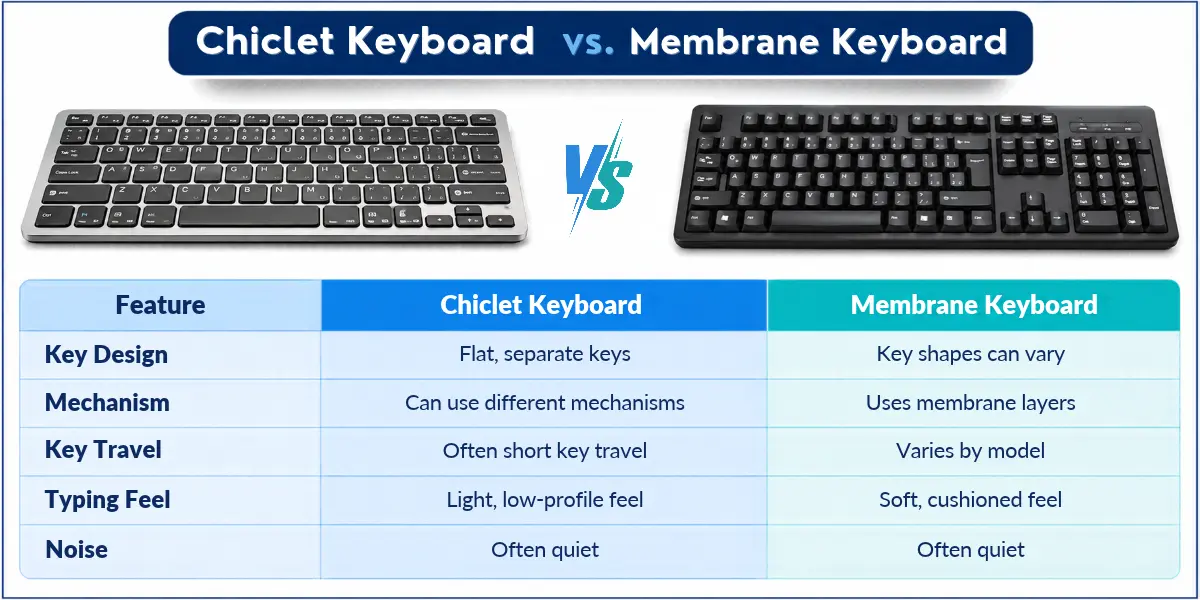
A chiclet keyboard has flat keys with small gaps between them, while a membrane keyboard uses layers under its keys to detect keypresses. Chiclet describes the key design, while membrane describes the internal mechanism. This means a chiclet keyboard can also use a membrane system.
What Is a Chiclet Keyboard?
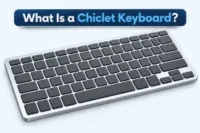
A chiclet keyboard has flat, square or rectangular keys with small gaps between them. The keys look like small islands, which gives the keyboard an island-style design.
Chiclet keyboards are among the different types of keyboards used in modern laptops and desktop computers. Their internal design can vary. Some use scissor mechanisms to guide key movement, while others use different designs.
What Is a Membrane Keyboard?
A membrane keyboard uses thin layers under its keys to detect keypresses. Many membrane keyboards also have rubber domes that provide resistance when you press a key.
Membrane keyboards come in different shapes and sizes. You can find them in many basic desktop keyboards and some slim keyboard models.
How Does a Membrane Keyboard Register a Keypress?
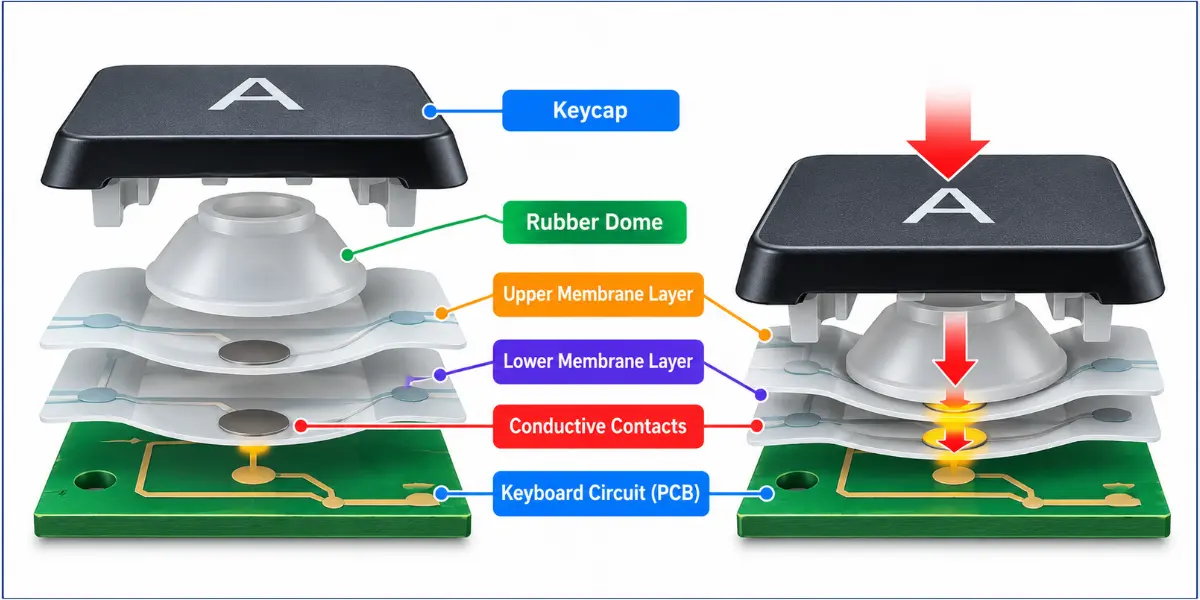
A typical rubber-dome membrane keyboard registers a keypress in these simple steps:
- You press a key.
- The key pushes a rubber dome down.
- The rubber dome presses the membrane layers together.
- The conductive layers make contact and complete an electrical circuit.
- The keyboard detects the keypress and sends the input to the computer.
Chiclet vs Membrane Keyboard: Key Differences
Chiclet and membrane keyboards differ in key design, internal mechanism, and typing experience. Here are the main differences to consider:
- Key Design and Spacing
- Internal Mechanism
- Key Travel and Actuation
- Typing Feel and Key Feedback
- Typing Noise
- Size, Thickness, and Portability
- Durability and Lifespan
- Maintenance and Cleaning
- Price
Let’s look at each difference in detail.
Key Design and Spacing
Key design, spacing, and placement affect the shape of the keys, the gaps between them, and how keys are arranged. These features can influence how easily you find and press each key.
Chiclet Keyboard
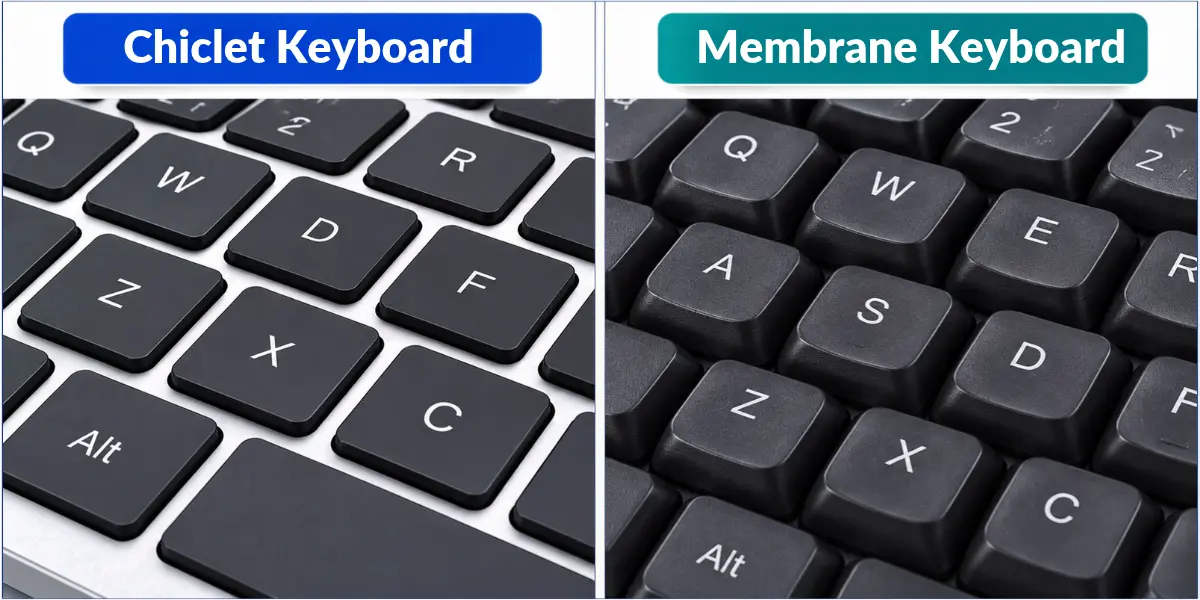
A chiclet keyboard has flat, square or rectangular keys with small gaps between them. This island-style layout makes each key easy to see.
Membrane Keyboard
A membrane keyboard can have different key shapes and layouts. Some models have round or closely placed keys, while others use flat keys with small gaps. A membrane keyboard can also have a chiclet-style design.
The size and spacing of the keys can affect typing comfort. Enough space may help you avoid pressing the wrong key, but the experience also depends on key size and keyboard layout.
Internal Mechanism
The parts under the keys help a keyboard detect each keypress. Different keyboard designs can use different mechanisms.
Chiclet Keyboard
Some chiclet keyboards use a scissor mechanism under each key. It helps the key move up and down and keeps it stable. Some models also use a membrane system to register keypresses.
Membrane Keyboard
Many membrane keyboards use rubber domes and membrane layers. The rubber dome provides resistance when you press a key. It also pushes the membrane layers together so the keyboard can detect the keypress.
A scissor mechanism and a rubber dome do different jobs. The scissor mechanism keeps the key stable as it moves, while the rubber dome provides resistance and helps the keyboard register a keypress. Some chiclet keyboards use both parts.
Key Travel and Actuation
Key travel is the distance a key moves when you press it. Actuation is the point at which the keyboard registers a keypress.
Chiclet Keyboard
Many chiclet keyboards have low-profile keys with short key travel. However, the amount of key movement and the actuation point vary by model.
Membrane Keyboard
Membrane keyboards can have different levels of key travel. Some have short key movement, while others allow keys to move farther. Their actuation point also varies by model.
Neither chiclet nor membrane keyboards have one fixed key travel or actuation point. These features depend on the keyboard’s design.
Typing Feel and Key Feedback
Typing feel describes how the keys feel when you press them. Key feedback is the response you feel while typing. Both can affect your typing experience.
Chiclet Keyboard
Many chiclet keyboards offer a light and soft typing feel. However, the amount of resistance and feedback can vary by model.
Membrane Keyboard
Many membrane keyboards have a soft and slightly cushioned feel. The amount of resistance and feedback can vary depending on the keyboard’s design.
Some people prefer a soft typing feel, while others like clearer feedback when pressing keys. Your choice depends on personal preference and the keyboard model.
Typing Noise
Typing noise is the sound a keyboard makes when you press its keys. It depends on the keyboard’s design and the way you type.
Chiclet Keyboard
Many chiclet keyboards produce relatively little noise. Their sound depends on the key mechanism, design, and the way you type.
Membrane Keyboard
Many membrane keyboards also produce little noise during typing. However, some models may make louder sounds when their keys are pressed.
If you need a quiet keyboard for an office, library, or classroom, check its sound level before buying.
Size, Thickness, and Portability
A keyboard’s size and thickness affect how much space it takes up and how easy it is to carry.
Chiclet Keyboard
Many chiclet keyboards are thin and light. You can find them in laptops and slim desktop keyboards. Their slim design can make them useful for travel and desks with limited space.
Membrane Keyboard
Membrane keyboards come in different sizes and shapes. Many common desktop models are thicker and larger than slim chiclet keyboards. However, some membrane keyboards are also thin and light.
The size and weight depend on the model. If you need a keyboard for travel or a small desk, check its size and weight before buying.
Durability and Lifespan
Durability means how well a keyboard handles regular use. Lifespan is how long it lasts before it stops working properly.
Chiclet Keyboard
The lifespan of a chiclet keyboard depends on its build quality and design. Some models can handle years of regular use. However, keys may become loose or stop working over time.
Membrane Keyboard
A membrane keyboard can also last for years. Its lifespan depends on the quality of its parts, how often you use it, and how well you care for it.
Both types can last a long time. Build quality, frequency of use, and care matter more than the keyboard type alone.
Maintenance and Cleaning
Both chiclet and membrane keyboards need regular cleaning to remove dust, dirt, and food crumbs. However, their key design can affect how easily you clean around the keys.
Chiclet Keyboard
Chiclet keyboards have small gaps between their flat keys. Dust and dirt can collect in these gaps. Use a soft brush to remove dust from around the keys. You can also wipe the keys with a soft, slightly damp cloth.
Membrane Keyboard
Membrane keyboards come in different key shapes and layouts. Some have closely placed keys, while others have more space between them. Use a soft brush or cloth to clean the keys and the surrounding areas. For detailed steps, read our guide on how to clean a membrane keyboard.
Before cleaning either keyboard, unplug it or turn it off. Avoid using too much water or liquid, as it may damage the keyboard.
Price
The price of a keyboard depends on its design, build quality, and features. Both chiclet and membrane keyboards are available at different prices.
Chiclet Keyboard
Many basic chiclet keyboards are affordable. Models with features such as backlighting or a slim design may cost more.
Membrane Keyboard
Many basic membrane keyboards are also affordable. Models with extra features or a different design may have a higher price.
A chiclet keyboard is not always more expensive than a membrane keyboard. Prices vary by model and features.
Chiclet vs Membrane Keyboard for Different Uses
Both chiclet and membrane keyboards can handle many everyday tasks. However, your work, typing preferences, and the keyboard’s features can affect which one suits you.
Office Work
Chiclet Keyboard
A chiclet keyboard may suit office users who prefer a slim design and clearly separated keys. Many models also produce relatively little noise, which can be useful in shared workspaces.
Membrane Keyboard
A membrane keyboard can be a practical option for office tasks such as data entry, emails, and document editing. Many basic models offer the features needed for everyday work.
Students
Chiclet Keyboard
Chiclet keyboards are common in laptops. Their slim design can be useful for students who carry a laptop between classes, libraries, and home.
Membrane Keyboard
A membrane keyboard can suit students who use desktop computers. Many basic models are affordable and work well for assignments, online classes, and other study tasks.
Typing
Chiclet Keyboard
A chiclet keyboard may suit people who prefer flat keys and short key movement. Its typing feel can vary by model.
Membrane Keyboard
A membrane keyboard may suit people who prefer a soft, cushioned feel. However, the typing experience also depends on the model.
If you type for long periods, consider the key feel, layout, and comfort. Try a keyboard before buying if possible.
Gaming
Chiclet Keyboard
Some chiclet keyboards are suitable for casual gaming. However, their performance depends on features such as key response and the number of keys they can register at the same time.
Membrane Keyboard
Many membrane keyboards can also handle casual gaming. Some models support anti-ghosting and key rollover. These features help the keyboard register several keys pressed at the same time and reduce unwanted or missed inputs.
If you play games that require several keys at once, check these features before buying.
Which Keyboard Should You Choose?
The right keyboard depends on your budget, typing comfort, and daily needs.
A Chiclet-Style Keyboard May Suit You If…
- You prefer flat keys with small gaps between them.
- You want a slim, low-profile keyboard.
- You need a keyboard for a laptop or a desk with limited space.
- You like the typing feel of a particular chiclet model.
A Membrane Keyboard May Suit You If…
- You want an affordable keyboard for everyday use.
- You prefer a soft or cushioned key feel.
- You need a simple keyboard for a desktop computer.
- You find a particular membrane model comfortable to use.
Check the Features Before You Buy
Before buying, check the keyboard’s key travel, typing feel, size, connection type, and price. If possible, try the keys yourself. These details can help you choose a model that suits your needs.
Final Thoughts
The chiclet vs membrane keyboard comparison shows that these terms describe different things. Chiclet refers to key design, while membrane describes how a keyboard registers keypresses. Some chiclet keyboards also use a membrane system.
After using different computer keyboards over the years, I have learned that typing comfort and key feel can vary from one model to another. A chiclet keyboard may suit you if you prefer flat keys and a slim design. A membrane keyboard may be a good option if you want an affordable keyboard for everyday use.
Choose a keyboard that feels comfortable and meets your needs.
Frequently Asked Questions about Chiclet Keyboard vs Membrane Keyboard
Find quick answers to common questions about chiclet and membrane keyboards. These FAQs will help you understand their differences, features, and uses.
Not always. Chiclet describes the shape and layout of the keys, while membrane describes the mechanism used to register keypresses. Some chiclet keyboards also use a membrane system.
It depends on the keyboard model. Some keyboards let you replace individual keys, while others do not. The keycap is the top part of a key that you press with your finger. On some keyboards, you can remove and replace individual keycaps. However, replacing a key can be difficult if its parts are damaged.
Yes. Both chiclet and membrane keyboards can have backlit keys. However, backlighting depends on the model and its features.
Most chiclet and membrane keyboards work with many computers. However, compatibility depends on the keyboard’s connection type and the operating system it supports.
Both chiclet and membrane keyboards can last for several years. Their lifespan depends on build quality, frequency of use, and care. Check the manufacturer’s durability information when comparing models.


- Be Respectful
- Stay Relevant
- Stay Positive
- True Feedback
- Encourage Discussion
- Avoid Spamming
- No Fake News
- Don't Copy-Paste
- No Personal Attacks
- Be Respectful
- Stay Relevant
- Stay Positive
- True Feedback
- Encourage Discussion
- Avoid Spamming
- No Fake News
- Don't Copy-Paste
- No Personal Attacks
