What Is a Chiclet Keyboard?
Published: 24 Sep 2026
If you have used a modern laptop, you have probably seen a keyboard with flat keys and clear gaps between them. But what is a chiclet keyboard, and how is it different from a traditional keyboard?
I have worked with computers and keyboards for many years. I often see beginners use this type of keyboard without knowing its name. You may also hear it called an island-style keyboard.
In this guide, I will explain what makes a chiclet keyboard different. You will learn how it works, its types, features, benefits, and drawbacks. I will also compare it with traditional and mechanical keyboards.
What Is a Chiclet Keyboard?
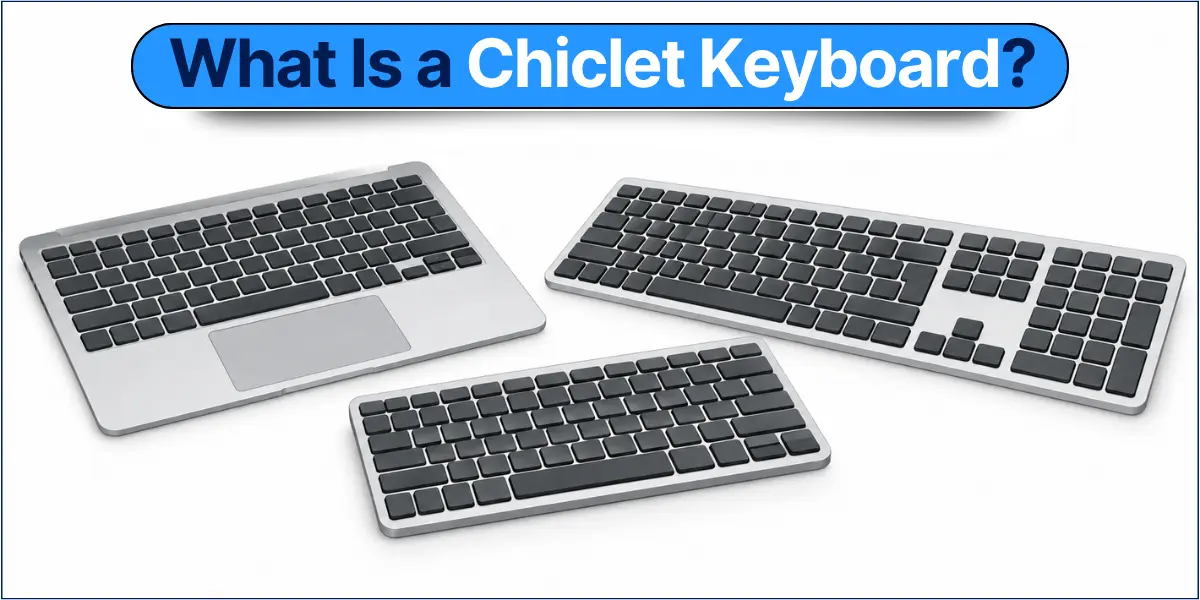
A chiclet keyboard is a keyboard design with flat, low-profile keys. Each key has clear space around it. This gives the keyboard a clean and simple look.
The keys are usually square or rectangular with rounded corners. You will often find this design on laptops and other slim devices. The space between the keys makes each key easy to see.
A chiclet keyboard is also called an island-style keyboard. Each key looks like a small island because it has space around it. The chiclet design describes the look and layout of the keys. The mechanism under the keys can vary between keyboards.
Why Is It Called a Chiclet Keyboard?
The name comes from Chiclets chewing gum. The small, flat keys look like the small pieces of gum, which is why this keyboard style is called a “chiclet” keyboard.
You may also hear the term chiclet-style keyboard. The name describes the shape and layout of the keys. It does not refer to one specific keyboard mechanism.
What Does a Chiclet Keyboard Look Like?
A chiclet keyboard has a clean, simple appearance that makes it easy to recognize. Look at the spacing, shape, and height of the keys to identify this keyboard style.
Flat and Separated Keys
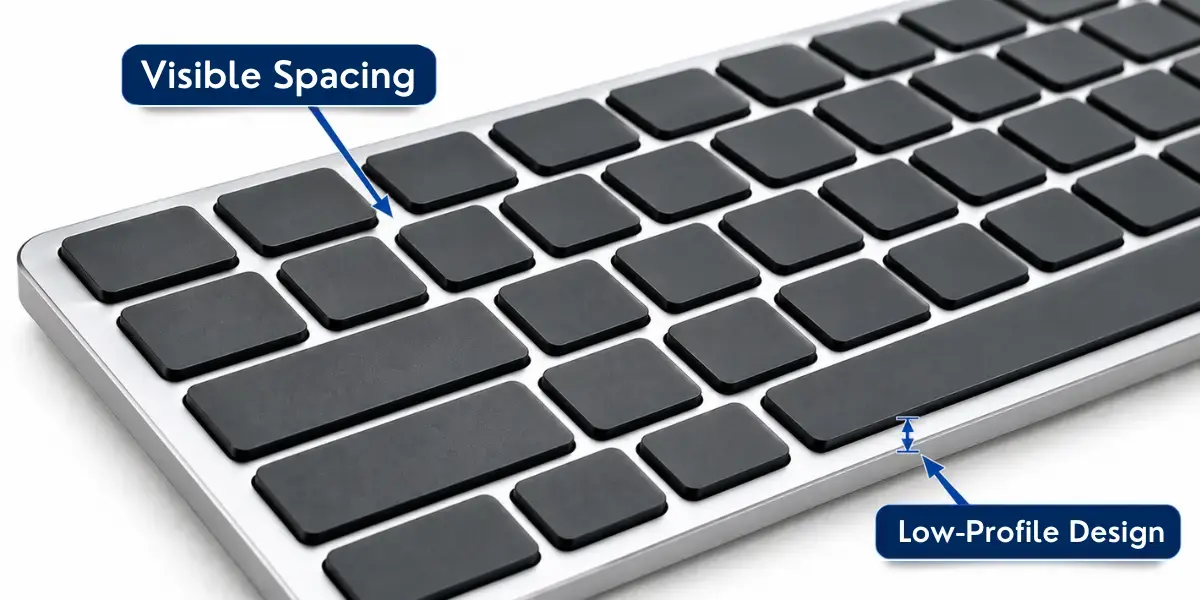
The keys are clearly separated, with a small visible gap around each keycap. A keycap is the top part of a key that you press. Most keys have a square or rectangular shape with rounded corners.
You can identify them by these features:
- Visible spacing: A small gap appears between the keys.
- Separate keycaps: Each key looks like an individual piece.
- Simple shape: The keys are usually square or rectangular with rounded corners.
Low-Profile Appearance
Chiclet keys sit close to the keyboard surface. They do not look tall or raised, which gives the keyboard a slim appearance. This design is especially familiar on laptop keyboards and other slim devices.
How Does a Chiclet Keyboard Work?
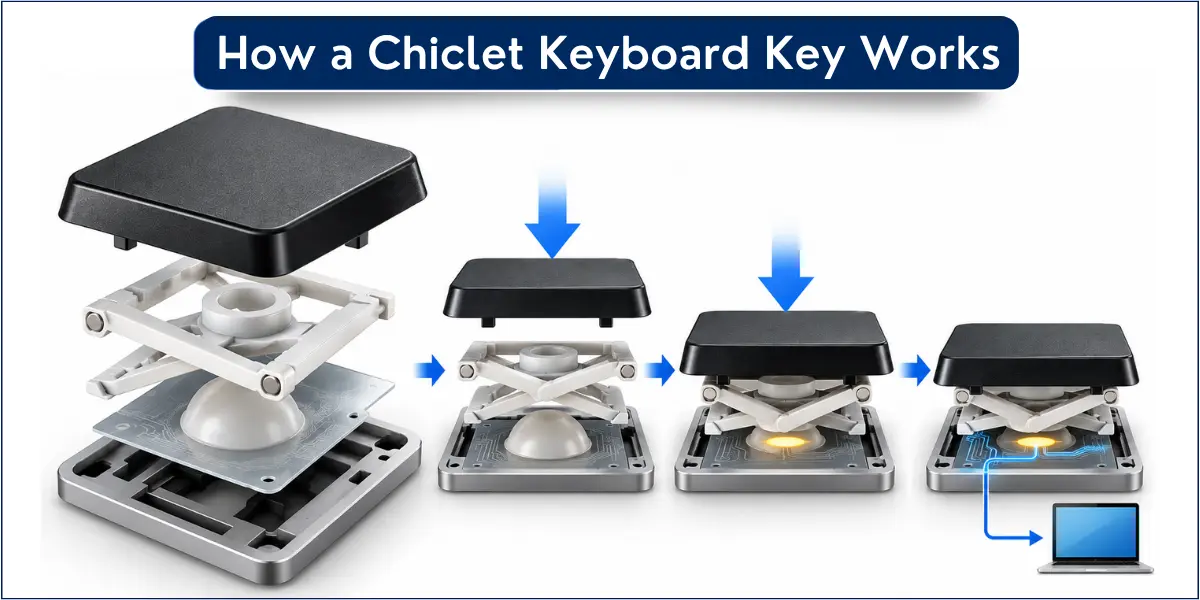
The flat, separated keys are only the visible part of a chiclet keyboard. Under each key, a mechanism detects the key press and sends an input to the computer. “Chiclet” mainly describes the key style and layout, not one universal switch mechanism.
What Happens When You Press a Chiclet Key?
When you press a chiclet key, the mechanism under the key detects the press. The keyboard then sends this information to the computer. The computer processes it as a letter, number, or command.
The basic process is:
Press the key → mechanism moves → key press is detected → computer receives the input.
What Mechanisms Are Used in Chiclet Keyboards?
Chiclet keyboards can use different mechanisms to register key presses. Common examples include scissor mechanisms and rubber-dome or membrane designs.
- Scissor mechanisms: Common in many low-profile laptop keyboards.
- Rubber-dome or membrane mechanisms: Use a flexible rubber layer to register a key press.
The exact mechanism can vary by keyboard model. A chiclet or island-style design does not automatically mean that the keyboard uses a scissor mechanism. The key style and the mechanism under the keys are different things.
What Are the Types of Chiclet Keyboards?
Chiclet keyboards can vary by key mechanism and connection method. These are variations of the chiclet design, not completely separate keyboard technologies. The key style can remain the same even when the mechanism or connection changes.
Scissor-Switch Chiclet Keyboards
A scissor-switch chiclet keyboard uses a scissor-like structure under each key. It helps keep the key stable as it moves and supports a low-profile design. This mechanism is common in laptops and other slim keyboards.
Membrane or Rubber-Dome Chiclet Keyboards
A membrane or rubber-dome chiclet keyboard uses a flexible rubber layer to register a key press. It can still have the flat, separated keycaps associated with a chiclet or island-style design.
Scissor and membrane mechanisms are not always completely separate. A scissor mechanism can also work with a rubber dome or membrane underneath the key. The exact design varies by keyboard model.
Wired and Wireless Chiclet Keyboards
Chiclet keyboards can use different ways to connect to a computer or other device. Wired and wireless describe how the keyboard connects, not the chiclet key design.
- Wired: Uses a cable, such as a USB cable, to connect to a computer or other device.
- Wireless: Connects without a cable, usually through Bluetooth or a wireless USB receiver.
Both wired and wireless keyboards can have a chiclet key design.
What Are the Features of a Chiclet Keyboard?
A chiclet keyboard has several features that affect its size and typing experience. These features also help explain why this keyboard style is common in laptops and other slim devices.
Low-Profile Design
A chiclet keyboard usually has a low-profile design. The keys sit close to the keyboard surface, which helps keep the keyboard thin.
- The keys sit close to the keyboard surface.
- The low height gives the keyboard a thin and compact look.
Short Key Travel
Key travel means how far a key moves when you press it. Chiclet keys generally move a shorter distance when you press them.
- The keys do not move as far when you press them.
- This shorter movement can feel different from taller keyboard keys.
Key Stability and Typing Feel
The typing feel can vary between chiclet keyboards. It depends on the keyboard’s mechanism and overall design.
- Scissor mechanisms often help keep the keycaps stable while you type.
- Different chiclet keyboard models can feel different when you type.
Compact Construction
Chiclet keyboards can have a compact design that takes up less space on a desk. This makes it easier to fit on a smaller desk.
- The keyboard takes up less desk space.
- The design looks clean and simple.
Where Are Chiclet Keyboards Used?
Chiclet keyboards are commonly found on laptops, slim desktop keyboards, and other compact devices. They are especially common where a slim and simple keyboard design is useful.
Laptops
Chiclet keyboards are widely used in laptops because they fit well into slim laptop designs.
- Many laptops use separate, low-profile keys.
- You can find them on both everyday and professional laptops.
Slim Desktop Keyboards
Chiclet keyboards are also available as external keyboards for desktop computers.
- They are a good fit for users who prefer a slim keyboard on their desk.
- They can connect through a cable or wirelessly.
All-in-One Computers
Chiclet keyboards are often used with all-in-one computers because they suit a clean desktop setup.
- They provide a slim keyboard option for everyday computer use.
- They are commonly paired with compact all-in-one systems.
2-in-1 and Portable Devices
Some 2-in-1 and portable devices also use chiclet-style keyboards for easy typing on the go.
- Detachable keyboards may use flat, separated keys.
- The exact keyboard design can vary by device.
What Are the Advantages of a Chiclet Keyboard?
A chiclet keyboard offers several practical benefits for everyday computer use. Its simple key layout and slim design make it useful for many modern devices.
- The space between keys makes each key easy to identify.
- The slim design works well in laptops and thin devices.
- Some chiclet keyboards are easier to carry because of their slim design.
- Many chiclet keyboards offer quieter typing.
- The separated keycaps can make the keyboard surface easier to wipe and clean.
What Are the Disadvantages of a Chiclet Keyboard?
Chiclet keyboards also have some limitations. The typing feel and design may not suit every user.
- The short key travel may not suit everyone.
- Some models give you less feedback when you press the keys.
- Users of traditional or mechanical keyboards may need time to adjust.
- Repair can be difficult on some devices, especially laptops.
Chiclet Keyboard vs Traditional Keyboard
Chiclet and traditional keyboards mainly differ in their key shape, height, and key movement. The table below shows these differences in simple terms.
| Feature | Chiclet Keyboard | Traditional Keyboard |
| Key design | Flat, separated keys | Usually taller keys |
| Profile | Usually low | Usually higher |
| Key travel | Generally shorter | Generally longer |
| Size | Often slim | Often bulkier |
| Common use | Laptops and slim keyboards | Desktop computers and other keyboards |
Chiclet Keyboard vs Mechanical Keyboard
A chiclet keyboard describes the style of its keys. A mechanical keyboard describes the switches under the keys. The table below shows the main differences in simple terms.
| Feature | Chiclet Keyboard | Mechanical Keyboard |
| Key design | Flat and separated keys | Often taller, separate keys |
| Switch mechanism | Can use scissor, rubber-dome, or other key mechanisms | Individual mechanical switches |
| Key travel | Usually shorter | Often longer |
| Typing feel | Varies by mechanism | Varies by switch type |
| Typing noise | Often quieter | Can be louder |
| Keyboard thickness | Usually slim | Often thicker |
| Common uses | Laptops and slim keyboards | Gaming and general typing |
Is a Chiclet Keyboard the Same as an Island-Style Keyboard?
Yes. Chiclet keyboard and island-style keyboard usually mean the same or a very similar key design. Both have separate keys with small gaps between them.
- Island-style: Each key looks like a small island because it has space around it.
- Chiclet: The flat keys look similar to small pieces of Chiclets chewing gum.
- You may see either term used for this type of keyboard.
- The exact name can vary between keyboard models.
Frequently Asked Questions About Chiclet Keyboards
Still have questions about chiclet keyboards? Here are quick answers about typing, gaming, laptops, and the keyboard design.
Yes, many chiclet keyboards work well for everyday typing. Their flat, separated keys are easy to identify, and many models offer a smooth and comfortable typing experience. However, the typing feel can vary based on the keyboard mechanism and design.
Chiclet keyboards can be good for casual gaming. Their short key travel and low-profile keys can make key presses quick and easy. However, some gamers may prefer a mechanical keyboard because it offers different types of switches and a more noticeable key feel.
Laptops use chiclet keyboards because they have a slim and compact design. The low-profile keys fit well inside thin laptops while leaving enough space between keys for comfortable typing.
Yes, a chiclet keyboard can be good for long typing sessions. Its low-profile keys and short key travel may feel comfortable for some users. However, comfort depends on the keyboard design and personal preference.
Look for flat, low-profile keys with visible gaps between them. If the keys look like separate small squares or rectangles, your keyboard is likely a chiclet or island-style keyboard.
Conclusion
If you are wondering what is a chiclet keyboard, it is a keyboard with flat, low-profile keys and visible space between them. It is also commonly called an island-style keyboard and is widely used on laptops and slim keyboards.
The key design is the main way to identify a chiclet keyboard, while its mechanism can vary by model. From my experience with computer hardware, I recommend checking the key design, key travel, and typing feel before choosing a keyboard. Use this guide to find the right keyboard for your needs.

- Be Respectful
- Stay Relevant
- Stay Positive
- True Feedback
- Encourage Discussion
- Avoid Spamming
- No Fake News
- Don't Copy-Paste
- No Personal Attacks
- Be Respectful
- Stay Relevant
- Stay Positive
- True Feedback
- Encourage Discussion
- Avoid Spamming
- No Fake News
- Don't Copy-Paste
- No Personal Attacks
