Chiclet vs Mechanical Keyboard: Key Differences
Published: 27 Sep 2026
Choosing between a chiclet keyboard and a mechanical keyboard can be confusing. They may look similar, but they can feel very different when you type. Key travel, typing feel, feedback, and noise can all affect your daily typing.
I have worked with different types of keyboards over the years. I have found that small differences in key feel, travel, and feedback can make a big difference during everyday use.
In this guide, we will compare Chiclet vs Mechanical Keyboard in simple terms. We will look at key design, typing feel, key travel, noise, durability, customization, and portability. We will also compare both types for students, office work, typing, gaming, programming, and everyday computer use.
What Is the Difference Between a Chiclet and Mechanical Keyboard?
A chiclet keyboard mainly describes the design of its keys, while a mechanical keyboard describes the type of switch under each key.
Chiclet Keyboard
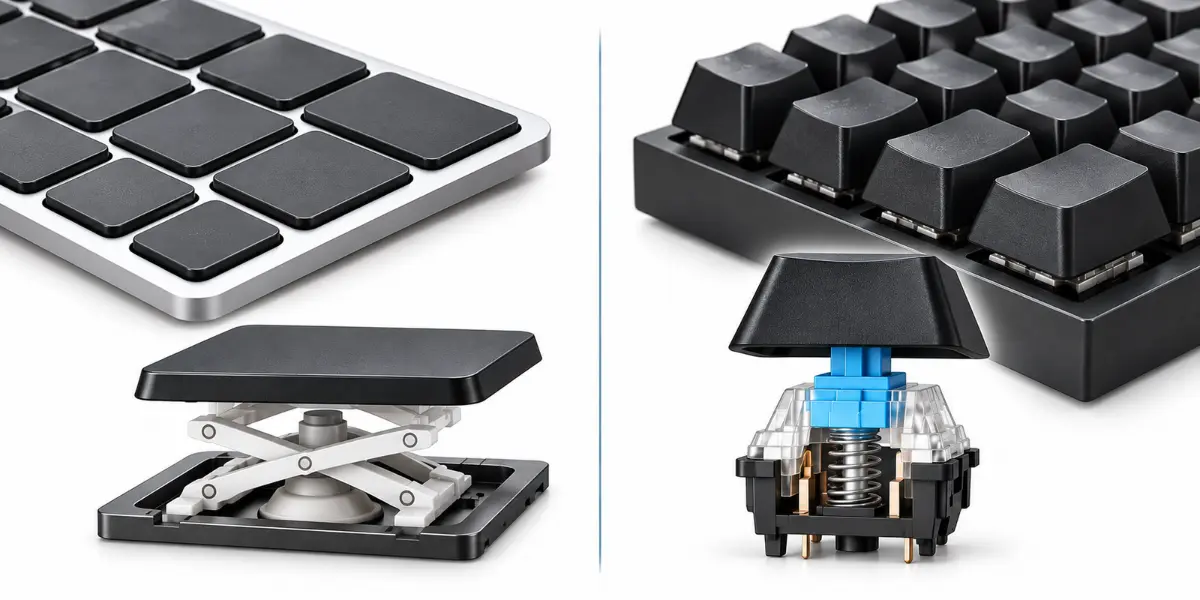
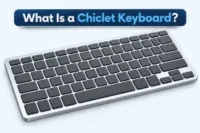
A chiclet keyboard has flat, spaced keys with a low-profile design. It may use a scissor mechanism or a membrane system with a rubber dome. These designs can help give the keyboard its slim shape and familiar typing feel.
Mechanical Keyboard
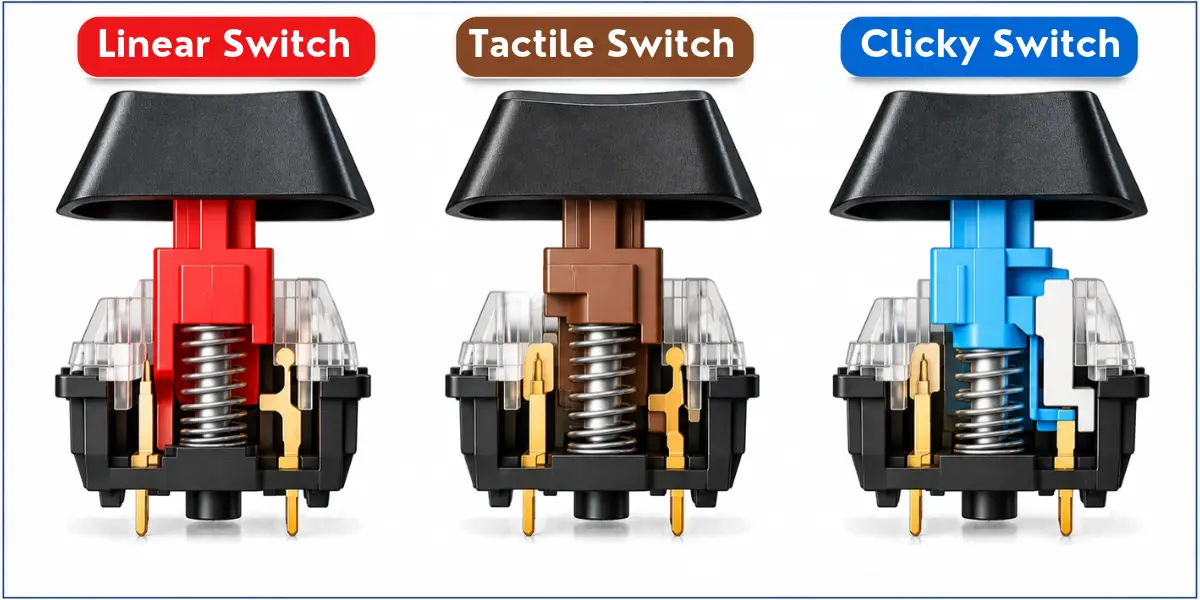
A mechanical keyboard uses a separate mechanical switch under each key. Common switch types include linear, tactile, and clicky switches. Each type gives a different level of key feedback when you type.
Chiclet vs Mechanical Keyboard: Key Differences
A chiclet keyboard and a mechanical keyboard differ in several areas that can affect typing and everyday use.
The main differences are:
- Key design and spacing
- Typing feel and key feedback
- Key travel and actuation
- Typing noise
- Durability and lifespan
- Customization and switch options
- Portability, size, and weight
Let’s look at each difference in simple terms.
Key Design and Spacing
Key design is one of the first differences you may notice. The keys can vary in shape, height, and spacing.
Chiclet Keyboard
A chiclet keyboard has flat and spaced keys. The keys usually have a low-profile design. They often use an island-style layout, with space between each key.
Mechanical Keyboard
Mechanical keyboards can have different key shapes and heights. Some models also use a low-profile design. Key spacing can vary based on the keyboard layout.
Typing Feel and Key Feedback
Typing feel is another major difference between these keyboards. The key feedback can make each keyboard feel different when you type.
Chiclet Keyboard
A chiclet keyboard usually gives a smooth and light typing feel. Its keys often have shorter travel and softer feedback.
Mechanical Keyboard
A mechanical keyboard gives more distinct key feedback. Its feel depends on the switch type. Linear switches feel smooth, tactile switches give a small bump, and clicky switches provide a bump with a clear click.
Key Travel and Actuation
Key travel and actuation affect how a key feels when you press it. They can make one keyboard feel softer or more responsive than another.
Chiclet Keyboard
Key travel is usually shorter on a chiclet keyboard. The key does not need to move very far before it registers the press. This can make typing feel quick and light.
Mechanical Keyboard
Mechanical keyboards often have more key travel, but this can vary by model and switch. The key usually moves farther before the keyboard registers the press. This can give you clearer feedback when typing.
Typing Noise
Typing noise is another difference between these keyboards. The amount of sound depends on the key design and switch used.
Chiclet Keyboard
A chiclet keyboard is usually quiet during normal typing. Its short key travel and soft key press produce less sound. This makes it useful in quiet places.
Mechanical Keyboard
A mechanical keyboard can be quiet or loud. Linear switches are often quieter, while tactile and clicky switches can produce more sound. A quieter mechanical keyboard can work well in shared offices and classrooms.
Durability and Lifespan
Durability depends on the keyboard’s build quality and how you use it. Both keyboard types can last for years with proper care.
Chiclet Keyboard
A chiclet keyboard can handle regular everyday use well. However, some models can be harder to repair if a key or internal part fails. Keycap replacement may also be limited by the keyboard design.
Mechanical Keyboard
A mechanical keyboard can also last for many years with proper care. Some models make it easier to replace keycaps or switches. This can help with maintenance and repair when a part wears out.
Customization and Switch Options
Customization is another area where these keyboards can differ. Mechanical keyboards usually give users more ways to change the typing experience.
Chiclet Keyboard
Chiclet keyboards usually offer limited customization. Some models allow keycap replacement, but the available options can depend on the keyboard design.
Mechanical Keyboard
Mechanical keyboards usually offer more customization options. Users can choose different keycap styles and mechanical switch types. Linear, tactile, and clicky switches can provide different typing feels.
Portability, Size, and Weight
Portability is another key difference between these keyboards. Size and weight can matter when you carry a keyboard or use it with a portable computer.
Chiclet Keyboard
Chiclet keyboards usually have a slim and low-profile design. They are often lighter and take up less space. This makes them common on laptops and other portable computers.
Mechanical Keyboard
Mechanical keyboards come in many sizes and designs. Some are compact, but many are heavier than chiclet keyboards. This can make them less convenient to carry.
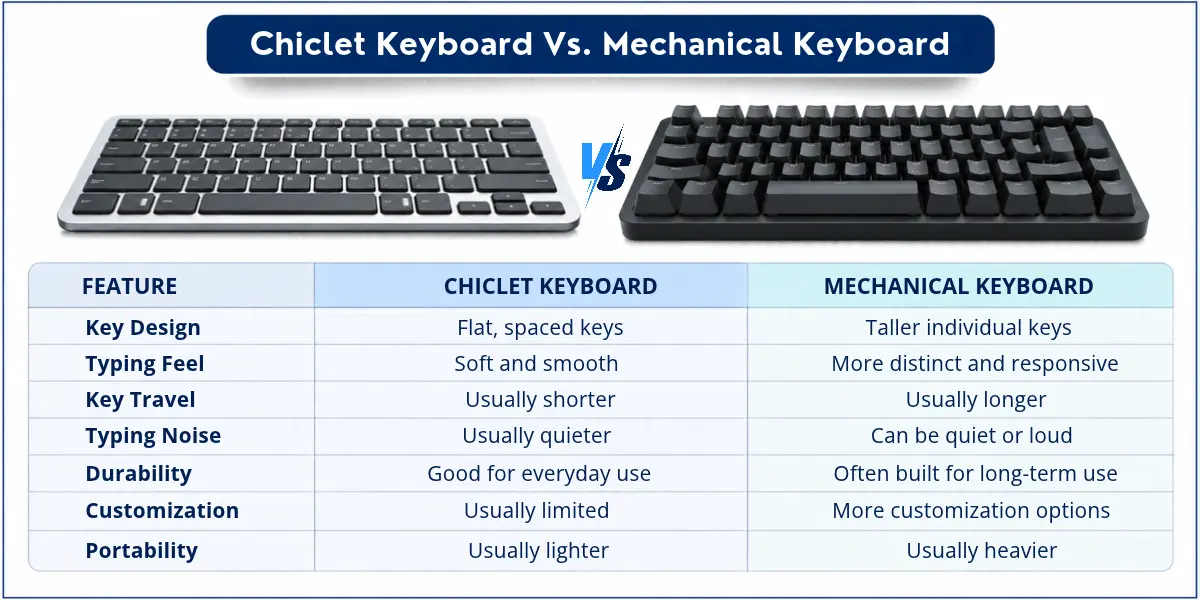
| Quick Comparison | ||||||||||||||||||||||||
|---|---|---|---|---|---|---|---|---|---|---|---|---|---|---|---|---|---|---|---|---|---|---|---|---|
|
A chiclet keyboard and a mechanical keyboard can feel very different when you type. The table below gives a quick look at their main differences.
|
Chiclet vs Mechanical Keyboard for Different Uses
The right keyboard depends on how you plan to use it. Your typing needs, work, and daily habits can affect which type suits you better.
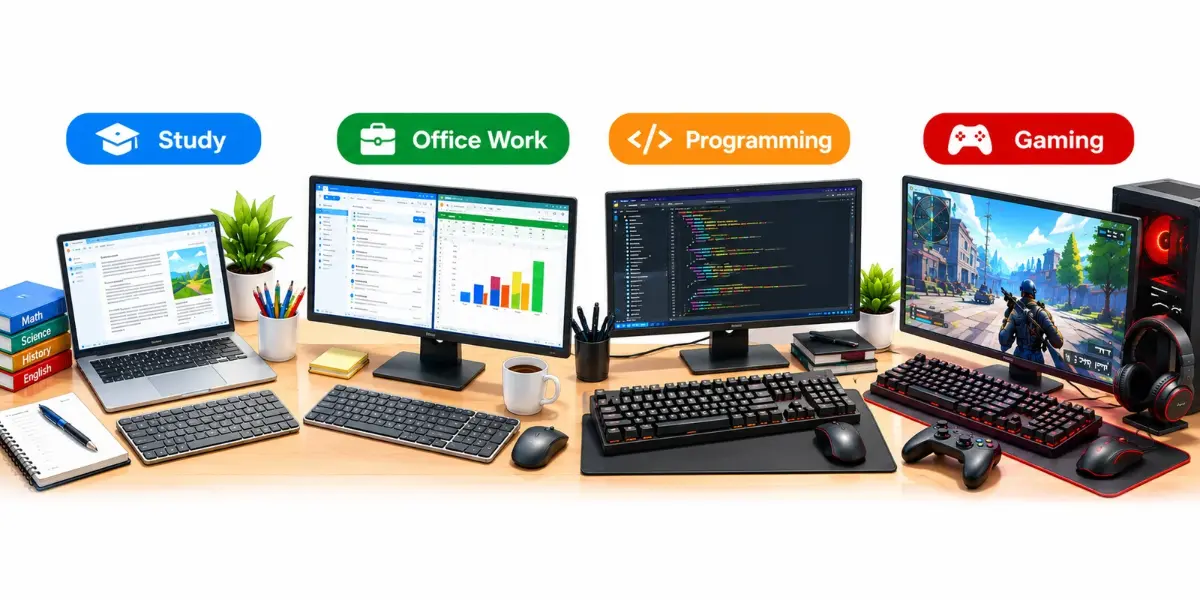
Chiclet vs Mechanical Keyboard for Students
Students often need a keyboard that is easy to carry and comfortable to use. Typing noise can also matter in classrooms, libraries, and shared study spaces.
Chiclet Keyboard
A chiclet keyboard is usually slim and easy to carry. It also tends to be quieter during everyday typing. This makes it a practical choice for students who use a laptop for notes, assignments, and web browsing.
Mechanical Keyboard
A mechanical keyboard can offer a more distinct typing feel. Some models are compact, but they can be heavier than a laptop keyboard. A quiet mechanical switch can also work well for students who type a lot at home or in a shared space.
For example, a student who carries a laptop to class may prefer its built-in chiclet keyboard. A student who mainly studies at a desk may prefer a separate mechanical keyboard.
Chiclet vs Mechanical Keyboard for Office Work
Office work often involves long typing sessions and shared workspaces. Typing comfort, noise, and portability can all affect daily keyboard use.
Chiclet Keyboard
A chiclet keyboard is usually quiet and easy to use for regular office tasks. Its low-profile keys can feel light during long typing sessions. Its slim design also makes it easy to move between work areas.
Mechanical Keyboard
A mechanical keyboard can provide clearer key feedback while typing. Some switches are quiet enough for shared offices. Its typing feel may suit people who spend many hours writing emails, reports, or documents.
Chiclet vs Mechanical Keyboard for Typing
Typing for long periods can make keyboard comfort important. The best choice depends on how you like your keys to feel and how you use the keyboard every day.
Chiclet Keyboard
A chiclet keyboard can feel light and simple during everyday typing. Its slim design and familiar key layout can suit students, office users, and people who type on laptops.
Mechanical Keyboard
A mechanical keyboard can suit people who want a more noticeable response from each key press. Different switches let users choose a typing feel that matches their personal preference.
Typing preference varies from person to person. Some users may prefer the simple feel of a chiclet keyboard, while others may enjoy the more distinct response of a mechanical keyboard.
Chiclet vs Mechanical Keyboard for Gaming
Gaming can require quick key presses, especially in fast games. Both chiclet and mechanical keyboards can work for gaming, but they can differ in responsiveness, key rollover, and anti-ghosting.
Chiclet Keyboard
A chiclet keyboard can work well for casual gaming and everyday play. Some models offer fast key response, key rollover, and anti-ghosting. These features can vary by model. Keyboards made for gaming may also include extra gaming features.
Mechanical Keyboard
A mechanical keyboard can give a clear response when you press a key. Some models support key rollover and anti-ghosting, which can help when you press several keys at once. Different switches also let users choose the key response they like.
For gaming, the keyboard’s features matter more than its shape alone. A chiclet keyboard can suit casual gaming, while a mechanical keyboard can offer more choices for gaming.
Chiclet vs Mechanical Keyboard for Programming
Programming often means typing for many hours. A keyboard that feels comfortable and easy to use can make long coding sessions easier.
Chiclet Keyboard
A chiclet keyboard can suit programmers who like a slim keyboard and a light typing feel. Its familiar layout makes it easy to type code, commands, and keyboard shortcuts. It can also be a good choice if you move your keyboard often.
Mechanical Keyboard
A mechanical keyboard can suit programmers who like clear feedback from each key press. Different keyboard layouts and switches give users more choices. This can help them find a keyboard that feels right during long coding sessions.
For programming, comfort and keyboard layout are important. Some programmers may prefer the simple design of a chiclet keyboard, while others may prefer the different choices offered by a mechanical keyboard.
Chiclet vs Mechanical Keyboard for Everyday Computer Use
Most people use a keyboard every day. They use it to browse the web, write emails, and work on documents. Both chiclet and mechanical keyboards can handle these tasks.
Chiclet Keyboard
A chiclet keyboard works well for web browsing, email, and documents. It also works well for general typing. Its slim design makes it easy to carry. This can be useful when you use a laptop or move between work areas.
Mechanical Keyboard
A mechanical keyboard can also handle everyday tasks. It can suit people who type a lot at a desk. Some users may prefer its clear key response. Some models are compact, but they may not be as easy to carry.
For everyday computer use, both keyboard types can work well. A chiclet keyboard can suit users who want a simple and portable option. A mechanical keyboard can suit users who mainly work at a desk.
Which Keyboard Should You Choose?
There is no single keyboard that is best for everyone. Your choice depends on how you type, where you use it, and what you need.
A Chiclet Keyboard May Suit You If…
- You prefer a slim keyboard with flat keys.
- You want a portable keyboard that is easy to carry.
- You prefer quieter typing in shared spaces.
- You mainly use a laptop and like its keyboard style.
- You need a keyboard for everyday use such as browsing, email, and documents.
A Mechanical Keyboard May Suit You If…
- You prefer stronger key feedback when you press a key.
- You want different switch options for different key feels.
- You want more customization with keycaps and other parts.
- You want useful gaming features such as key rollover and anti-ghosting.
Conclusion
Chiclet vs Mechanical Keyboard is mainly about key design, typing feel, and how the keyboard works. These keyboards can also differ in key travel, noise, durability, customization, and portability.
I have used different computer keyboards over the years. I have found that the right choice depends on how you use your keyboard. A chiclet keyboard may suit everyday use and portability. A mechanical keyboard may suit users who want more customization options and a different typing feel.
Compare your needs and choose the keyboard that suits you best.
Frequently Asked Questions about Chiclet vs Mechanical Keyboard
Here are some common questions about Chiclet vs Mechanical Keyboard. These short answers cover a few practical questions about both keyboard types.
Mechanical keyboards can be noisy because of the switches under the keys. Clicky switches make a clear clicking sound when you press them. Other switches can be quieter. The keycaps and keyboard design can also affect the sound.
Yes, professional gamers can use mechanical keyboards. Mechanical keyboards can provide fast key response, key rollover, and anti-ghosting. These features can help when a game needs fast key presses. However, every gamer has different needs and preferences.
Yes, a chiclet keyboard can be good for typing. Its flat keys and short key travel can give you a light and simple typing feel. It can work well for students, office work, and everyday computer use.
Usually, chiclet keyboards are not mechanical. Chiclet describes the key design, while mechanical describes the type of switch under each key. Most chiclet keyboards use a scissor mechanism or membrane system instead of mechanical switches.
Yes, a chiclet-style keyboard can use mechanical switches. In this case, chiclet describes the key design, while the mechanical switch controls how each key works. This design is less common than standard chiclet keyboards.
Yes, some mechanical keyboards have a low-profile design. They use shorter keys and usually have less key travel than standard mechanical keyboards. This gives the keyboard a slimmer shape while keeping its mechanical switches.
Yes, you can use a mechanical keyboard with a laptop. You can connect it through USB or Bluetooth, depending on the keyboard and laptop. This lets you use an external mechanical keyboard with your laptop.


- Be Respectful
- Stay Relevant
- Stay Positive
- True Feedback
- Encourage Discussion
- Avoid Spamming
- No Fake News
- Don't Copy-Paste
- No Personal Attacks
- Be Respectful
- Stay Relevant
- Stay Positive
- True Feedback
- Encourage Discussion
- Avoid Spamming
- No Fake News
- Don't Copy-Paste
- No Personal Attacks
